9/23/09
Set
top box interconnections
“Set
top box” (STB) is a term that can include any type of accessory that may
connect to the HDTV. Common STBs are
satellite receivers, cable TV receivers, OTA receivers, DVD players, VCRs, and
so on. In the HDTV era, an STB usually
has a large memory where the image is reassembled out of the MPEG-2 data.
Standard DVDs do not have enough capacity for
HD. Blu-ray Disk (BD, which requires a
blue laser) is generally the only choice for HD movies. Most BD players will also play standard DVDs.
Warning: Older DTV receiver models were often very
buggy, cranky units. Before buying a
“bargain” used receiver you should probably see what has been written about it
on the AVSforum.
STB video output options
At the present time it is a mistake to buy a TV or STB that does not have an HDMI connector. HDMI has become the industry standard, but other types of connections still exist. Any STB you acquire will probably have more than one of these output connectors. When you buy an HDTV and an STB, try to select units that can connect to each other directly. Otherwise you will have to pay for a transcoder or a video switch box.
- CH3/CH4 output ATSC output by this method is very rare. Many converter boxes output NTSC this
way.
- Composite video This 1-wire standard, in use for many years, conveys
complete video images. It is
designed for NTSC and cannot transport HDTV images. Phono plugs are standard.
- S-video
This 2-wire standard is an improvement over composite video. But it was designed for NTSC and cannot
carry HDTV images.
- Component video
This 3-wire standard, originally designed for DVD players, can
carry HDTV via three wires with phono plugs. The three wires carry analog raster
(image scanning) signals, either red/green/blue or Y/Pr/Pb. (Y=intensity, Pr=red-Y, and Pb=blue-Y.) Some units can handle either color
scheme. You must verify that both
units can use the same scheme.
Neither scheme is better than the other. Phono plugs are standard.
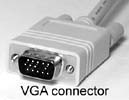
- VGA This 5-wire standard, originally devised for
computer monitors, carries HDTV raster signals, usually red, green, blue,
Hsync, and Vsync. However in some
units Y, Pr, and Pb can substitute for the colors. Usually the 5 wires are bundled into a
single cable. Five separate cables
are advised for runs longer than 12 feet.
The connector can be either a 15-pin VGA connector or five BNC
connectors. Warning: some HDTVs
have VGA inputs that only accept computer formats, such as 600x800 and
720x1024. Many makers use the term
RGB in place of VGA despite the confusion that causes.
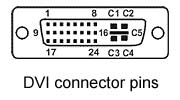
- DVI (Digital
Visual Interface) This connector
conveys HDTV raster-like signals in binary data form. The data rate is very high (typically
1.65 Gb/s). Binary data is
preferred by monitors that are not CRTs, such as plasma, LCD, DLP, and
others. It also has a control line
(DDC) that allows the STB to sense the monitor’s state and native formats.
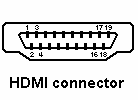
- HDMI This miniature connector replaces DVI. It is backward compatible with DVI, and
an adapter will connect it to a DVI unit.
It has 19 pins and carries DVI plus digital audio. It also has another control line (CEC)
that lets units control each other.
Cables longer than 15 feet are possible but require special care
and possibly special repeater boxes.
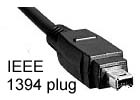
- IEEE 1394
Also called Firewire or i.link, this is a high-speed
serial bus common in computers.
IEEE 1394 is fast enough to carry compressed MPEG-2 video data plus
audio and controls. There is an
encryption standard for IEEE 1394, called DTCP (Digital
Transmission Content Protection, also called 5C copy protection). But since IEEE 1394 is an open standard,
Hollywood has less control over it.
Since it is a two-way bus, it could allow units to control each
other. IEEE 1394 is just a
connector definition plus a software shell. Additional software is required for the
units to talk to each other. HAVi
(Home Audio Video Interoperability) is such software. HAVi allows plug-and-play recognition of
devices, interoperability, and brand independence.
1394
has important technical advantages. All
outboard recording devices will likely use 1394, but Hollywood does not want to
allow outboard (dismountable) media.
Some companies have developed radio schemes for moving audio/video
material around a home wirelessly. But
these schemes usually require 1394 and might become useless if 1394 is blocked.
- USB
Mainly camcorders use this.
Its workings are a lot like IEEE 1394.



For
options 1-3 above: If the STB has any of these connectors, it is only for
standard definition images. When a
high-def program is being received, these connectors are either disabled or
carry an image that has been down-converted to NTSC.
VGA
and component video are sometimes called “analog” because they carry signals
that are not binary. DVI, HDMI, and 1394
are sometimes called “digital” connections.
Analog connections are inferior to digital connections when the monitor
is not a CRT, but this inferiority can be insignificant if the cables are
chosen with sufficient care. Neither VGA
nor component video is superior to the other.
For a cable length of six feet, VGA is more convenient. For longer runs, component video is usually
more convenient. Component video is the
prevalent analog output, and VGA is becoming rare.
Very
few displays will draw both 1080i and 720p.
If you feed the set a format that it cannot draw, you will get either a
blank screen or garbage. (The law
requires a set to receive all 18 modes.
But the law only regulates tuners, not these intermediate inputs.) An exception to this is fixed-pixel displays
that will re-digitize component video.
Decryption
DVI and HDMI come with a decryption
option called HDCP (High-bandwidth Digital Content Protection), which
will decode encrypted programs such as first-run movies. The motion picture industry requires
distributors (HBO, etc) to use HDCP encryption on all high-def movies. HDCP decryption hardware is proprietary, and
any hardware manufacturer must sign a contract in order to include it in his
product. That contract can forbid hi-def
analog output (VGA or component video) when encryption is enabled, and allows
HDCP decryption to take place only in the monitor. This is an attempt by Hollywood to prevent
unauthorized copying and distribution of hi-def material. But it means that millions of HDTVs already
sold that have only analog inputs could in the future become useless (or
low-def) except for viewing whatever sitcoms or dramas the networks allow. Some people think the FCC would forbid that
for a while but not forever.
While all blu-ray disks are encrypted, the
disabling of analog HD output is a separate flag, called the “Image Constraint
Token” (ICT). Thus far, all of the
available movies have the token turned OFF, so analog HD output is allowed for
these movies. How long movies will be
introduced with the token OFF is unknown.
The state of the token is supposed to be printed on the packaging. (If the token is ON, the image on component
video output will be down-converted to 540p.)
This
author believes that Hollywood will not carry out its threat any time
soon. What Hollywood is most concerned
about is movie piracy via the Internet.
That is currently not practical at high definition because it takes too
long. But if it should become practical
and piracy proliferates, Hollywood wants to shut down those STBs that
contribute to it. (Hollywood would then
not release films to distributors who enable STBs with piratable outputs.) The FCC will certainly side with Hollywood if
movie piracy makes movie making unprofitable.
This is not all bad since it guarantees home access to first-rate
films.
STB audio output options
An STB is likely to provide one or more of the following audio outputs:
- 6 channel audio (6 wires with phono plugs)
- Coaxial digital audio (1 wire with phono plug)
- Optical digital audio (1 TOSlink fiber optic line)
- IEEE 1394 audio and video
- HDMI audio and video
Again,
it is wise to plan this before buying.
You could be in a bind if the TV and STB do not have enough of the right
connectors.
The HDMI Audio
Problem
HDMI
carries digital audio, but it is carried on the video signal lines during the
video blanking periods. This audio is in
a form that is not easily convertible into SPDIF (optical or coaxial digital
audio). SPDIF is the normal input for
A/V Receivers (audio power amplifiers).
This
is not a problem if you are going to rely on the speakers or audio power
amplifiers that come inside the TV. It
is also probably not a problem if your system has only one HDMI source. But if you have more than one HDMI cable
(multiple HDMI sources) then you might discover you have no way to connect up
the A/V Receiver.
Here
are your options:
1.
Just
connect the TV SPDIF Output to the
A/V Receiver. Unfortunately many TVs
lack this connector. If your TV provides
neither SPDIF nor “line” audio outputs then there is no way to connect it to an
A/V Receiver. Some TV SPDIF Outputs put out fewer than 6
audio channels.
2.
The
A/V Receiver probably has multiple SPDIF inputs. But if it does not have multiple HDMI inputs
then you must use the TV to switch HDMI.
You will have to use two remotes every time you want to switch sources,
or buy a universal remote and learn how to program it.
3.
Or
you could buy an HDMI switch box that also switches SPDIF. But most HDMI switch boxes do not have an
SPDIF output.
More about DVI
DVI
was originally developed for computer monitors, but has been adopted by
HDTV. DVI comes in different versions. All versions use the same 29-pin
connector. Sometimes you can tell which
version you have by seeing how many of the 29 pins are missing.
DVI-D is the version most commonly used for
HDTV. The five large pins are usually
missing. There is a single link
version of this that uses only 18 of the 24 small pins. Single link will work properly with all
HDTVs.
DVI-I uses all 29 pins. The five large pins pass analog VGA
signals. Presently, DVI-I is used mainly
by the computer industry, but front projector HDTVs by a number of makers
support DVI-I. There are DVI-to-VGA
adapters and adapter cables available for these units. Front projectors from a couple makers will
accept component video signals through their DVI connectors. These companies will provide DVI-to-Component
adapter cables. However this is
nonstandard.
These
adapter cables only work with DVI-I. In
most cases, if you want to connect a DVI unit to a VGA or component unit, these
adapters will not work. That would
require a transcoder circuit that can convert between analog and digital
signals.
HDMI is a single link DVI plus digital
audio and a control line in a miniature connector. It carries no analog signals.
The
remainder of this page is nonessential reading.
You should skip it unless you are curious about how HDMI works.
DVI (and HDMI)
A
CRT is a device with no memory. DVI
assumes all displays have no memory. DVI
assumes all displays require scanning in the manner of a CRT. DVI will refresh each pixel once per frame,
even if the pixel has not changed since the previous scan.
But
instead of three analog signal lines (red, green, and blue) there are three
digital signal lines (red, green, and blue) plus a clock line. The clock line pulses once per pixel drawn. The data signal rate is 10 times the clock
rate. During each pixel 10 bits are
passed over each signal line, 30 bits in all.
24 of these bits are the color value.
The other 6 are control bits. The
maximum allowed clock rate is 165 MHz, which would allow 165 megapixels/second
minus about 5% for vertical and horizontal blanking times.
The
maximum data rate is said to be 1.65 Gbits/second, which would be the bit rate
(data and control) over one digital signal line. The three data lines together can pass 4.95 Gbits/second.
There
are some variations on the above:
·
For
480i, pixels are sent multiple times to keep the data rate from being low. The monitor discards the extra copies.
·
Data
rates above 4.95 GB are allowed but require a “dual-link”. A dual-link has 6 data lines, not 3. If a dual-link is still not fast enough then
the clock rate is allowed to exceed 165 MHz.
Each
of the above clock and signal lines has 3 wires: plus, minus, and shield (a
shielded twisted-pair).
It
might be said that the industry chose a technology with an artificially high
data rate to make piracy more difficult.
Two
additional connector pins are used for DDC (Display Data Channel). DDC is a medium-speed unidirectional channel
between the two units. The monitor uses
it for identifying its operating modes and formats to the STB.
HDMI
HDMI
is partially compatible with DVI. The
new features with HDMI are:
·
HDMI
single-link uses a miniature 19-pin connector.
An even smaller connector is available for portable equipment like
camcorders. Dual-link uses a miniature
29-pin connector
·
Digital
audio is provided. It is carried on the
video data lines between frames and between lines. (The timing is not the same as SPDIF.)
·
HDMI
has one connector signal that DVI lacks:
One additional pin is used for CEC (Consumer Electronics Control). This is a very low speed party-line wire that
connects to possibly every STB and unit in the user’s system. It conceivably allows any unit to control any
other unit, possibly eliminating all but one remote controller.
·
Red,
green, and blue are standard, but Y, Pr, and Pb are allowed. Pr and Pb can be skipped every other pixel.
HDMI 1.3
·
The
single-link clock speed limit is raised to 340 MHz. Single-link will pass up to 10.2 Gbits/second
(data and control). Dual-link is used
for speeds higher than that. (This
author has never seen the dual-link HDMI connector. 1080 60p will work with a single link, but
1080 120p would require a dual-link according to the HDMI 1.3 spec.)
·
Pixels
with 8, 10, 12, and 16 bits/color are allowed.
There is always 1 clock pulse for every 30 bits. So when the pixels are larger than 24 bits,
the clock rate will be higher than the pixel rate.
·
An
“Auto lip-sync” feature keeps the audio and video synchronized.
·
A
“Reference Cable Equalizer” circuit makes longer cables possible.
HDCP
This
encryption scheme is used only for the cable between the STB and the
monitor. The MPEG data received from the
source (DVD, satellite, or cable company) may be protected by some other
encryption scheme. If so it must be
decrypted so it can be used for building the complete image in the STB’s
memory, which is then re-encrypted using HDCP.
(Older
DVDs are protected by an encryption scheme called “CSS”. Blu-ray uses “AACS”.)
When
encryption is enabled, every pixel data bit is exclusive-ORed with a
pseudo-random data bit before transmission via HDMI. The STB and the monitor agree upon the
pseudo-random data pattern during authentication. Non-video data is likewise protected.
Authentication
is performed periodically, whenever the STB demands it. Every box (STB and monitor) has a set of
binary keys assigned to it. These keys
are generated by a company called Digital Content Protection LLC, a subsidiary
of Intel, and are assigned to the box when it is manufactured. Some of the steps in authentication are:
1.
The
public key – private key method is
used to prove that each box is an authorized unit. The public key is 40 bits long and the
private key is 2240 bits.
2.
The
Key Revocation List is searched to
see if a box has been associated with piracy.
The DVD or distribution company provides this list.
3.
A
seed value is chosen for the pseudo-random data stream.
The
encryption scheme is designed to be hard to crack. Breaking it probably requires saving the
entire movie on disk and then launching a deciphering program that could take
many hours or days. But the high data
rate of HDMI means that 30 terabits of disk memory would be required to save
the entire encrypted data stream of a two hour 1080p movie, and not many people
have that much storage at their disposal.
Stealing
a valid set of keys is easier. “HDCP
Stripper” boxes with stolen keys can be purchased. Such boxes are illegal in the United States,
and their keys could someday end up on the Key Revocation Lists.
Some
manufacturers have used the same set of keys in all their boxes of the same
type. If any of those boxes ever ended
up on the Key Revocation Lists then many innocent people would lose
functionality.
WHY not DTCP?
IEEE
1394 has obvious advantages over HDMI.
The lower data rate makes it easier to route the signal around the
house, either through CAT5-like cable or wirelessly. The MPEG decoding can be more tailored to the
capabilities of the monitor if the monitor does the decoding. This usually results in a better picture, easier
operation, lower cost, and a much simpler planning process for the buyer.
But,
according to rumors, the DTCP encryption scheme used by IEEE 1394 has been
successfully violated, and a program for doing so might be easily
downloadable. Hopefully someday the
studios will come to their senses and adopt an un-crackable successor to DTCP.
This page is part
of “An HDTV Primer”, which starts at www.hdtvprimer.com